


- ProductsProduct OverviewInteractive MapIntelligent SearchIndoor NavigationWayfindingAccessibilityLocation SharingOutdoor-Indoor NavigationLocalizationContent Management System (CMS)Product OverviewContextual MessagingAudience SegmentationLocation-Based AdvertisingMarketing CRM SoftwareGeofencingGeo-ConquestingProximity Marketing
- Industries
Big Box RetailAdvanced navigation, marketing and analytics solutions
Corporate OfficesTransform your building and how people and assets move within it
Higher Education FacilitiesElevate the student experience and maximize campus efficiencies
Hospitals & HealthcareLocation positioning solutions to improve operational efficiencies and support patients
Historical & Cultural FacilitiesReenergize your museum with powerful interactive location technology
Leisure & Recreational FacilitiesLocation technology will keep guests informed, relaxed and loyal
Nature & Conservation AreasCreate a more visitor-friendly, efficient and data-driven natural space
Ports & Container TerminalsRun a safer, faster terminal and prove it to your insurer
StadiumsTurn your stadium into an interactive, view-click-conversion powerhouse
Multi-Event FacilitiesMaximize the attendee experience and exhibitor ROI with location technology
Transportation HubsCreate an informative and efficient travel experience with location technology
Retail Shopping MallsAdvanced navigation, marketing and analytics solutions
Industrial & Manufacturing FacilitiesMake your facility more efficient, safer and fully data-driven
- Innovation
- Resources
- About Us


Every truck. Every person. Every move.
Mapsted Yard Watch for container terminals and port yards
See it. Act on it. Prove it. Trust it.
Yard Watch gives terminal management, operations and safety teams one shared picture of the yard — so a safer shift is also a faster one.
See
The whole yard, live — and on replay
Every truck, machine and crew member on the real terminal map, live, or replayed for any shift or time window.
Act
One inbox. A clear next step.
Alerts from every source land in one place, and Insights turn the last 7 or 30 days into plain “what to do” steps.
Prove
Evidence built for your insurer
Incident timelines, an insurer report for the last 30 days and an audit trail of who did what, and when — built automatically.
Trust
Clear data rules. Safety keeps working when the network doesn't.
Working time is reported per crew and a person look-up in Look back needs a reason and is logged — and alarms, zone rules and SOS relay keep working on site even when cloud or cellular is cut.
See the pattern. Fix the crossing.
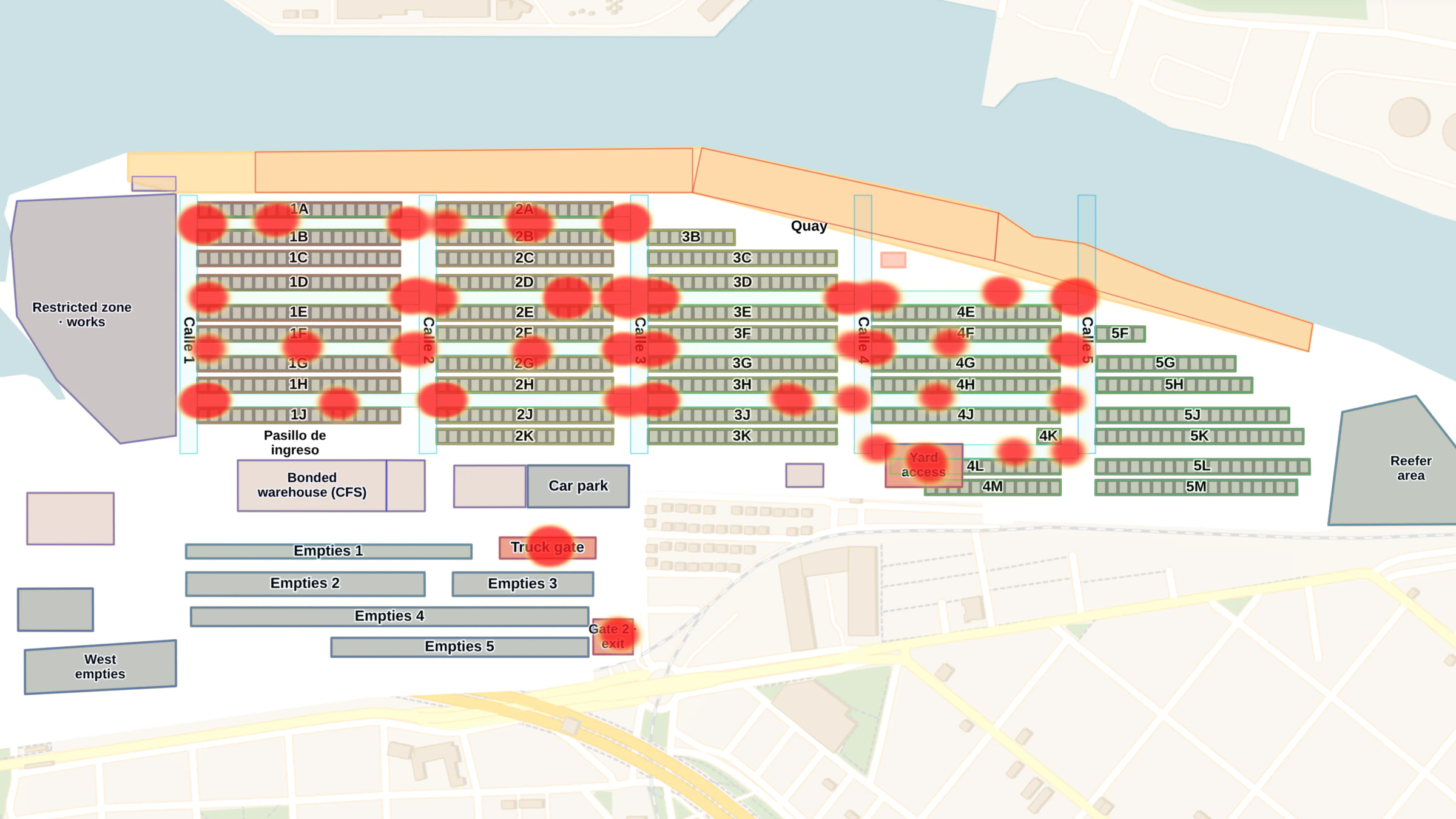
A near-miss alert lands in one inbox. One click replays the moment on the terminal map. Over a month, the heat map shows where near-misses cluster — so you fix the crossing, not just the report.
Shorter truck waits. Fewer lost crane hours.
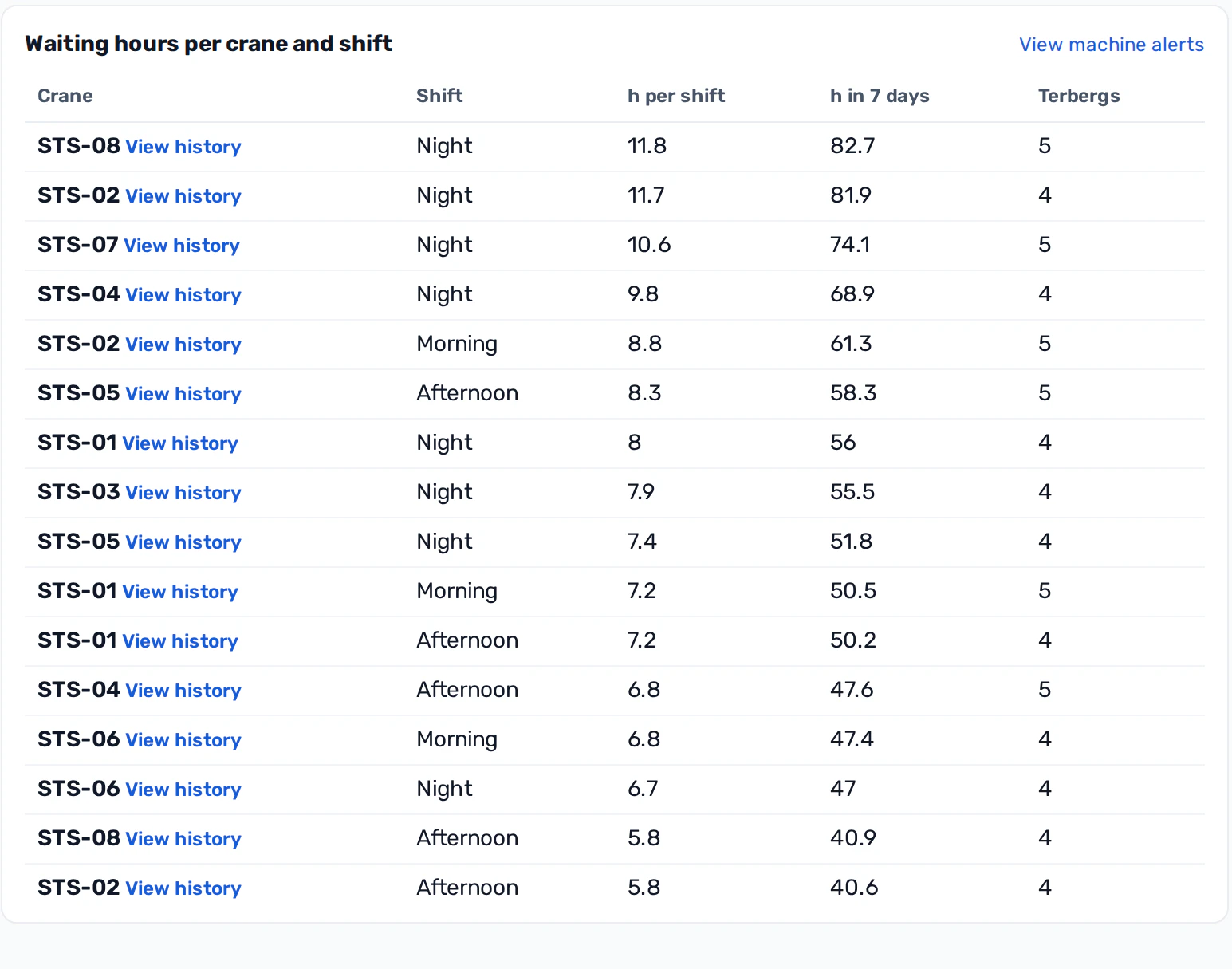
See where trucks wait at each crane and on each shift, get long waits as alerts while the shift is still running, and plan maintenance from the hours machines actually moved.
Everything the yard needs, in one place
Live yard
Shift readiness at a glance: who is on site, which machines are running, where every truck is now.
Insights
Plain-language “What to do” cards built from the last 7 or 30 days, with each area's own numbers.
Alerts
One inbox for every alert, rules you switch on or off, and a heat map that shows where near-misses cluster.
Look back
Pick a shift or time window and replay it — the camera follows the truck you choose.
Fleet & machines
Where trucks wait, per crane and shift, minutes lost per truck, and service planned from real motion hours.
Safety & health
SOS to medic on scene, heat and cold stress, fall detection and a live evacuation headcount.
People & access
The wristband is the access pass — with clone alerts and per-crew time reports; a person look-up in Look back needs a reason and is logged.
Reports
An insurer-ready report and an audit trail of who did what, and when, ready when you are asked.
Trust & privacy
Per-crew time reports, logged person look-ups, and alarms, zone rules and SOS that keep working when the cloud is cut.
Frequently asked questions about Mapsted Yard Watch
What is Mapsted Yard Watch?
Mapsted Yard Watch is a safety and operations platform for container terminals and port yards. It shows every truck, machine and crew member on the terminal map, live and on replay, brings every alert into one inbox, and builds evidence for your insurer and auditors.
Who is Yard Watch for?
Terminal managing directors, operations leaders and heads of health, safety and environment. They share one picture of the yard: safety teams see near-misses and SOS calls, operations sees truck waits and machine use, and management gets the evidence.
How does Yard Watch help with near-misses?
Each near-miss lands in one alert inbox with a one-click replay of the moment on the terminal map. Over weeks, a heat map shows where near-misses cluster, so you can fix the crossing or the route, not just file the report.
How does Yard Watch improve terminal operations?
It shows where trucks wait at each crane and on each shift, raises long waits as alerts during the shift, and plans maintenance from the hours machines actually moved.
Does Yard Watch track individual workers?
Each wristband has a live position — that is what makes the alarms, SOS and evacuation headcount work. Working time is reported per crew, for groups of five or more, and a person look-up in Look back needs a stated reason and is written to the access log.
What happens if the cloud or cellular connection is cut?
Alarms, access rules and SOS relay keep working on site. The live map, history and reports pause and catch up when the link returns.
Does Yard Watch replace our safety procedures?
No. Yard Watch supports, and does not replace, your safety procedures and emergency services.
Built to protect crews — and to keep working
Working time is reported per crew, a person look-up in Look back needs a stated reason and is logged, and every action taken on an alert is kept in an audit trail. When cloud or cellular is cut, alarms, zone rules and SOS relay keep working on site; queued events are sent when the link returns.
Already used to track 1,000+ assets across multiple sites.
Yard Watch supports, and does not replace, your safety procedures and emergency services.
Talk to Us. Let's Do This!


See how Mapsted’s technology can help your business grow with a demo from one of our experts.
Request DemoConnect with our experts on how our latest indoor navigation and location solutions can drive your business forward.
Schedule a Call


