


- ProductsProduct OverviewInteractive MapIntelligent SearchIndoor NavigationWayfindingAccessibilityLocation SharingOutdoor-Indoor NavigationLocalizationContent Management System (CMS)Product OverviewContextual MessagingAudience SegmentationLocation-Based AdvertisingMarketing CRM SoftwareGeofencingGeo-ConquestingProximity Marketing
- Industries
Big Box RetailAdvanced navigation, marketing and analytics solutions
Corporate OfficesTransform your building and how people and assets move within it
Higher Education FacilitiesElevate the student experience and maximize campus efficiencies
Hospitals & HealthcareLocation positioning solutions to improve operational efficiencies and support patients
Historical & Cultural FacilitiesReenergize your museum with powerful interactive location technology
Leisure & Recreational FacilitiesLocation technology will keep guests informed, relaxed and loyal
Nature & Conservation AreasCreate a more visitor-friendly, efficient and data-driven natural space
Ports & Container TerminalsRun a safer, faster terminal and prove it to your insurer
StadiumsTurn your stadium into an interactive, view-click-conversion powerhouse
Multi-Event FacilitiesMaximize the attendee experience and exhibitor ROI with location technology
Transportation HubsCreate an informative and efficient travel experience with location technology
Retail Shopping MallsAdvanced navigation, marketing and analytics solutions
Industrial & Manufacturing FacilitiesMake your facility more efficient, safer and fully data-driven
- Verified Presence™
- Innovation
- Resources
- About Us


See every visit you pay for, verified inside the building.
You received a Verified Presence™ report- When the worker entered and left each area
- Gaps shown, never counted as time on site
- Each visit marked complete or partial


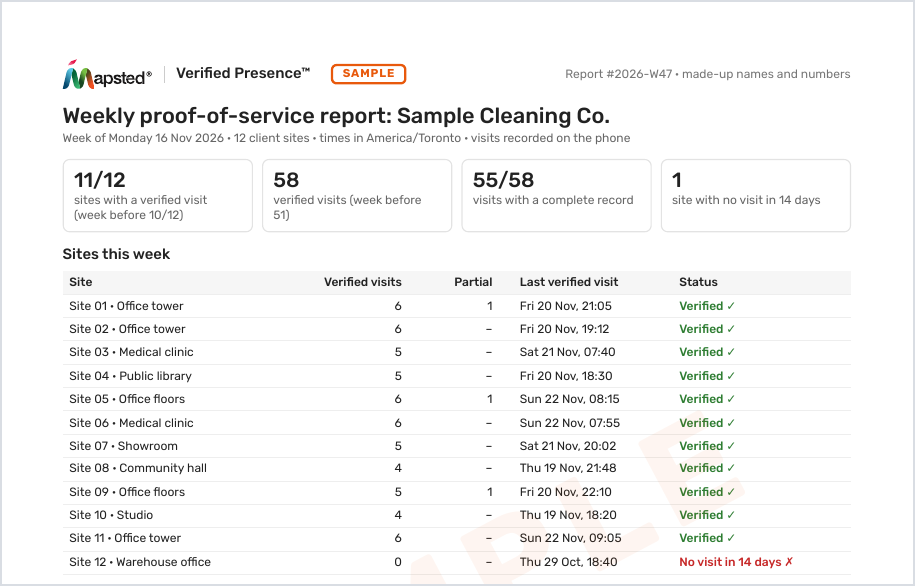
How to read your report
Start and end: the first and last moment of the visit inside your site. A visit ends after an hour with no data from the site, or when the worker is recorded at another site.
Zone by zone: when the worker entered and left each area, for example a washroom or a display.
Gaps: where the phone was not seen, the report shows a gap and never counts it as time on site.
"At least": a stay cut short by a gap, or by the start or end of the recording, is shown as a lower limit, never as an exact time.
Complete or partial: each visit says whether the record covers the whole visit or only part of it.
Return trips: coming back to the same site later is listed as a new visit, so you see each one.
How the visit was verified
Inside the app your team already uses
The Mapsted SDK, added to your own app
Your app records the visit on the phone your team already carries. Mapsted rebuilds it into a verified visit for the client's site: the path on the floor plan, where the person stopped and for how long, which zones they entered and left, and when the visit started and ended.
Omni Tag
A small battery tag, carried or fixed to a cart
A worker carries the tag, or it rides on a cleaning cart. No anchor nodes are needed in the building. It reports the zones it visited, how long it stayed and when it was offline, and can raise an alert when a zone visit is too long or too short in the hours you set.
Ask your other contractors for the same proof
If other firms clean, guard, stock or service your sites, ask them for the same report. Each firm runs Verified Presence for its own team, and you read every report the same way.
Keep your contracts on evidence, not trust.
Questions about your report
Who sent me this report?
Your contractor. They run Verified Presence for their own team; Mapsted makes the system that turns their visits into verified visits for your site.
Can the visit link be changed to show a different visit?
No. For phone visits, your contractor can send you a visit link. It opens one visit on the floor plan, with the route and every stop. It works for ten minutes and cannot be edited to show a different visit.
How was the visit recorded?
Either inside the app the contractor's team already uses, with the Mapsted SDK added, or with an Omni Tag the worker carries. Not from a paper sign-off sheet, a photo or a sticker.
We have our own team. Can we use it too?
Yes. Start a pilot with one site: Mapsted sets it up, usually in about 1–2 weeks, and your team's visits there become verified visits.
Is Verified Presence real-time?
With the phone, no: a verified visit is usually ready within 75 minutes after the phone finishes uploading. An Omni Tag shows as online when its position was updated in the last 5 minutes.
Do I have to set anything up myself?
Mapsted sets up each site for you: the floor plans, walkable areas and zones. For the phone, your developers add the Mapsted SDK to your own app. For Omni Tags, Mapsted's project team sets up your tags on site and gives you access.
Does Mapsted need to know who my workers are?
No. You can link visits to your own worker ID, which means nothing to Mapsted on its own. An Omni Tag is only linked to a person if you link it; role names such as "Cleaner 3" work fine.
How is the data protected?
Mapsted is ISO 27001 and ISO 9001 certified. Each customer's data is walled off: access is set by the key Mapsted issues, never by the request, and for the phone API a leaked key can be shut off at once.
How much does it cost?
Talk to us about pricing.
Talk to us about a pilot
Run your own team, or want a contractor to start? Tell us which site you would start with and how visits there are proven today.
Talk to Us. Let's Do This!


See how Mapsted’s technology can help your business grow with a demo from one of our experts.
Request DemoConnect with our experts on how our latest indoor navigation and location solutions can drive your business forward.
Schedule a Call


