


- ProductsProduct OverviewInteractive MapIntelligent SearchIndoor NavigationWayfindingAccessibilityLocation SharingOutdoor-Indoor NavigationLocalizationContent Management System (CMS)Product OverviewContextual MessagingAudience SegmentationLocation-Based AdvertisingMarketing CRM SoftwareGeofencingGeo-ConquestingProximity Marketing
- Industries
Big Box RetailAdvanced navigation, marketing and analytics solutions
Corporate OfficesTransform your building and how people and assets move within it
Higher Education FacilitiesElevate the student experience and maximize campus efficiencies
Hospitals & HealthcareLocation positioning solutions to improve operational efficiencies and support patients
Historical & Cultural FacilitiesReenergize your museum with powerful interactive location technology
Leisure & Recreational FacilitiesLocation technology will keep guests informed, relaxed and loyal
Nature & Conservation AreasCreate a more visitor-friendly, efficient and data-driven natural space
Ports & Container TerminalsRun a safer, faster terminal and prove it to your insurer
StadiumsTurn your stadium into an interactive, view-click-conversion powerhouse
Multi-Event FacilitiesMaximize the attendee experience and exhibitor ROI with location technology
Transportation HubsCreate an informative and efficient travel experience with location technology
Retail Shopping MallsAdvanced navigation, marketing and analytics solutions
Industrial & Manufacturing FacilitiesMake your facility more efficient, safer and fully data-driven
- Verified Presence™
- Innovation
- Resources
- About Us


What your client sees.
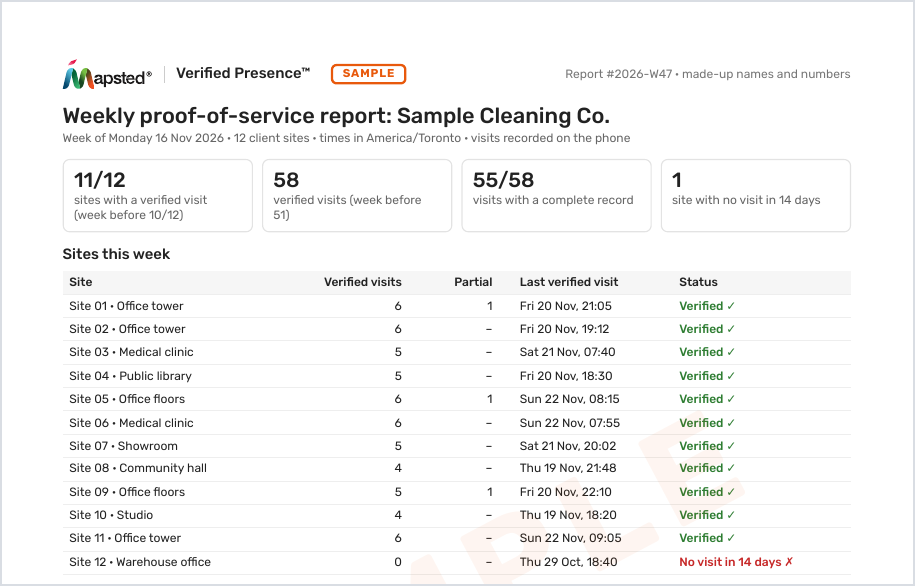
Verified Presence™ by Mapsted: a sample report- Coverage for the week, beside the week before
- The site nobody visited in 14 days, in red
- One visit zone by zone: entered, left, time in zone

What's in the report
- Four numbers for the week: sites visited and verified visits (each beside the week before), complete records, sites with no visit in 14 days
- Every client site in one table: visits, partial records, last verified visit, and a red line for any site with no visit in 14 days
- One visit zone by zone: when the worker entered and left each area, with gaps shown and never counted
- The exceptions listed on their own: the site with no visit, the partial records, the return trip
- A short note on how to read it
One A4 page. An example layout made by Mapsted from what Verified Presence records; it is not a file the product exports. Every name and number is made up.
Get the sample report (PDF)
How to read it
Start and end: the first and last moment of the visit inside the site. A visit ends after an hour with no data from the site, or when the worker is recorded at another site.
Return trips: coming back to the same site later is listed as a new visit, so your client sees each one.
Gaps: where the phone was not seen, the report shows a gap and never counts it as time on site.
"At least": a stay cut short by a gap, or by the start or end of the recording, is shown as a lower limit, never as an exact time.
Complete or partial: each visit says whether the record covers the whole visit or only part of it.
A link for your client: you can also send a link that opens one visit on the floor plan, with the route and every stop. It works for ten minutes and cannot be edited to show a different visit.
With Omni Tag
With Omni Tags the report lists the zones each tag visited and how long it stayed, with time moving between zones and time the tag did not report kept apart.
Your proof that you were there. No more false blame.
Every visit becomes a tamper-evident record of the rooms you covered and the time you spent on site. If a visit is disputed, the evidence settles it, not someone's word. Site reports leave out any group of fewer than 5 people, so totals can't single anyone out. An Omni Tag can carry a role name like "Cleaner 3" instead of a person's name.
Room-level records need each room set up as a zone. The fewer-than-5 rule applies to site reports from the phone (5 is the default); role names apply to Omni Tags.
See it with your own sites
Tell us how you prove your work today and which site you would start with.
Talk to Us. Let's Do This!


See how Mapsted’s technology can help your business grow with a demo from one of our experts.
Request DemoConnect with our experts on how our latest indoor navigation and location solutions can drive your business forward.
Schedule a Call


